Testimonials
Services
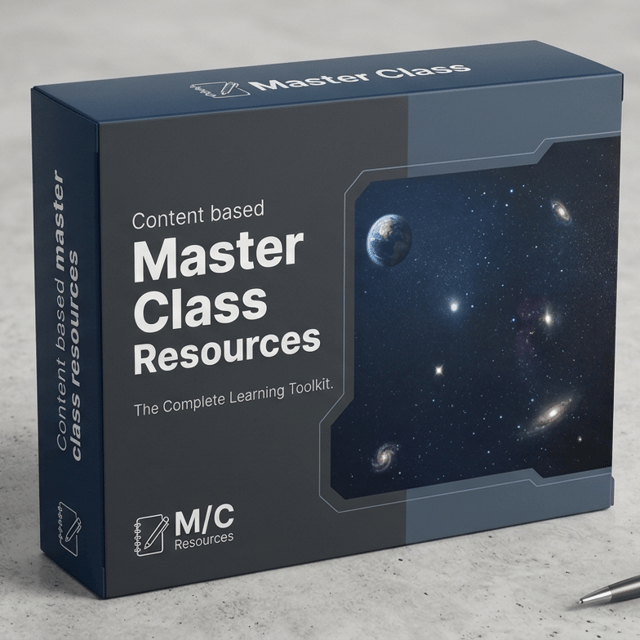
Editor’s Masterclass Bundle
Quick Editing Assist
Content Creation Starter Call
Priority DM
Editing Starter Call
About me
- Get up to 50% OFF on 1:1 Video Editing & Content Creation Calls!
Frequently asked questions
What is video editing and why is it important?
Video editing is the process of selecting, cutting, and arranging raw footage, then adding music, sound, text, transitions, and colour to turn it into a finished video. It's important because editing decides whether people keep watching — pacing, hooks, and clean audio are what separate a video that gets skipped from one that holds attention on YouTube, Instagram, and ads. For creators and brands, editing directly affects views, retention, and how professional the content looks.
How to start freelance video editing with no experience?
Learn one editing tool properly first — Premiere Pro if you're serious, or a free option like CapCut or DaVinci Resolve to begin. Then create 3–5 sample edits by re-cutting existing footage, making a highlights reel for a creator, or editing your own videos, and publish them as a simple portfolio. Pick a niche (YouTube videos, reels, podcasts, wedding films), charge a modest rate for your first 2–3 clients, and use their testimonials and referrals to raise your rates. Experience comes from completed projects, not certificates.
How to get freelance video editing jobs in India?
Freelance video editing jobs in India are posted daily on platforms like Upwork, Fiverr, Internshala, and LinkedIn, and in creator communities on Telegram and Discord. Alongside job portals, apply directly to YouTubers, coaches, and small brands whose content you already watch — most editing work is never publicly listed. Beginners usually land their first paid job faster by sending 2–3 sample edits with a short, specific pitch than by waiting on job boards.
Can I do freelance video editing work from home?
Yes — video editing is one of the most remote-friendly freelance skills, and freelance video editing work from home is completely normal in India. All you need is a decent laptop, editing software, stable internet, and a file-sharing workflow, since clients typically send footage over Google Drive and you deliver the final cut online. Many Indian editors work entirely from home for YouTubers, agencies, and even overseas clients.
How do I get freelance video editing clients as a beginner?
Build a small portfolio of 3–5 strong edits first, then pick 20–30 small creators or businesses in one niche and send personalized messages pointing out a specific improvement you can make — for example, tighter intros or better captions. Offer one or two discounted edits to earn testimonials, ask every happy client for referrals, and post your work publicly on Instagram or LinkedIn so people can find you. Most freelance video editing clients come from repeat work and referrals once you land the first two or three.
Is freelance video editing worth it?
Yes, if you treat it as a real skill business. Demand keeps growing because every YouTuber, brand, coach, and podcaster needs consistent video content, and good editors are hard to find. The first few months are slow while you build skills and a portfolio, but once you have 3–4 regular clients, editing can become a steady income you earn entirely from a laptop. It's most worth it for people who genuinely enjoy the craft — that's what keeps editors improving and booked.
Is a paid video editing course worth it, or is YouTube enough?
You can learn the basics of any editor from free YouTube tutorials, but many beginners get stuck in "tutorial hopping" without a clear learning path. A structured video editing course is worth it when it gives you a step-by-step roadmap, feedback on your actual edits, and real projects to practice on — that's usually what turns scattered knowledge into client-ready skill. Start free if you're self-disciplined; invest in a course when you're stuck or want to start earning faster.
Can I learn video editing in mobile, or do I need a laptop?
You can absolutely start with a phone — plenty of editors begin with how to do video editing in mobile using free apps like CapCut or VN, which are good enough for reels, shorts, and simple client edits. But long-form YouTube videos, client projects, and proper colour grading are much easier once you learn how to do video editing in laptop with software like Premiere Pro or DaVinci Resolve. A practical path is to start on mobile to learn cutting, pacing, and music, then move to a laptop when you start charging for your work.
Which is the best free video editing app for beginners?
On mobile, CapCut is the most popular free video editing app — it's easy to learn, has auto-captions and templates, and exports clean reels and shorts, with VN as a good alternative for more manual control. On laptop, DaVinci Resolve's free version is the strongest option because it's professional-grade software used in real film and YouTube workflows, so anything you learn transfers directly to paid client work. Start with whichever device you already own.
Will AI replace video editors?
AI video editing tools are already very good at repetitive tasks — auto-captions, silence removal, basic cuts, and template-style edits — and they'll keep taking over the boring parts of the job. What AI still can't do well is storytelling: understanding why a moment matters, matching a creator's style, controlling pacing, and handling client feedback. The realistic answer is that AI won't replace editors, but editors who use AI will work faster and outperform those who ignore it.
What is Premiere Pro used for?
Premiere Pro is Adobe's professional video editing software, used to cut and arrange footage, sync audio, add music and sound effects, insert text and graphics, and colour-grade videos. It's the industry standard for YouTube videos, ads, short films, and brand content, which is why most clients and agencies expect editors to know it. If you're learning video editing for freelance work, Premiere Pro is usually the first desktop software worth mastering.
What is Premiere Pro and After Effects — do I need to learn both?
They're two different Adobe programs that work together. Premiere Pro is where you edit — cutting clips, building the story, syncing audio, and colour correcting — while After Effects is for motion graphics and visual effects like animated titles, logo reveals, and green screen work. Most editors learn Premiere Pro first and add After Effects later when they want to offer animated intros, captions, or VFX. For starting freelance work, Premiere Pro alone is enough.
How to download Premiere Pro for free?
The only safe way is Adobe's official free trial — create an account on Adobe's website and download the full Premiere Pro trial, which lasts 7 days. Avoid "Premiere Pro APK" files and cracked versions from random sites; they're illegal and very often bundled with malware that can infect your laptop. If you need a free option beyond the trial, DaVinci Resolve's free version is powerful enough for real client work.
How to add transitions in Premiere Pro?
Open the Effects panel, go to Video Transitions, and drag a transition like Cross Dissolve directly onto the cut point between two clips on your timeline. You can drag the transition's edges to make it longer or shorter, and set a default transition you can apply instantly with a keyboard shortcut. One tip beginners need most: use transitions sparingly — a clean cut is usually stronger than a dissolve, and overusing effects is the fastest way to make an edit look amateur.
How much is the Premiere Pro price in India?
Premiere Pro is subscription-only through Adobe Creative Cloud — there's no one-time purchase option — and the Premiere Pro price in India works out cheaper on annual plans, with a further student discount if you qualify. Adobe also offers a 7-day free trial, so you can test it before paying anything. If the subscription feels heavy while you're still learning, DaVinci Resolve's free version covers most of what beginners and even working editors need.