Testimonials
Services
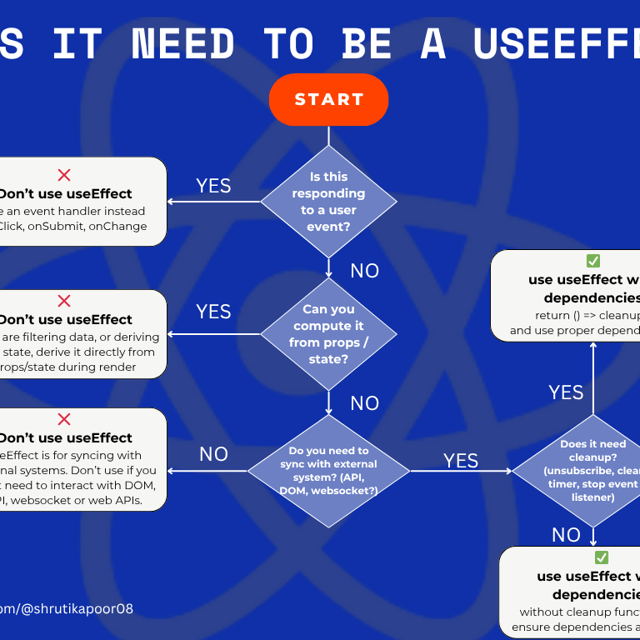
React useEffect checklist to avoid 16 mistakes
Mock Interview - JavaScript, React, Frontend
TanStack Start Cheatsheet
Got a quick question?
1 hour mentorship session
Get your Dream Job package
About me
- Shruti Kapoor is lauded for her empathetic guidance, structured resources, and clear communication, significantly aiding others in their tech careers.
 AI-generated based on testimonials
Frequently asked questions
What are the most common React interview questions and answers?
The most common React interview questions cover the virtual DOM and reconciliation, state vs props, controlled vs uncontrolled components, useEffect and lifecycle behavior, keys in lists, and performance optimization with memoization. For the answers, interviewers expect you to explain the "why" behind React's design decisions, not just recite definitions. Practicing each answer out loud alongside a small code example is the fastest way to sound confident instead of rehearsed.
What React interview questions for 2026 should I expect?
Expect React interview questions for 2026 to lean heavily on modern React: hooks in depth, React 19 features like Actions and the use API, Server Components, Suspense, and frameworks built on React such as Next.js and TanStack Start. Interviewers increasingly ask you to reason about rendering strategies and data fetching (client vs server) rather than only component syntax. Review the release notes from the last few React versions and be ready to discuss what changed and why it matters.
Which React Hooks interview questions come up most often?
React Hooks interview questions usually start with useState and useEffect, then go deeper: cleanup functions, dependency arrays, stale closures, useCallback vs useMemo, and writing custom hooks. A frequent exercise is "build a custom hook for X," such as a fetch hook or a debounce hook. Reviewing a checklist of common useEffect mistakes before your interview is an easy way to avoid the traps interviewers deliberately set.
What do React interview questions for senior developers focus on?
React interview questions for senior developers focus less on syntax and more on architecture: state management trade-offs, profiling and fixing re-renders, code splitting, testing strategy, accessibility, and mentoring. You'll often get system-design-style prompts like "architect a large dashboard" or "refactor a slow app." Prepare stories from real projects where your decisions had measurable impact — that's what separates senior answers from mid-level ones.
How do I prepare for a frontend interview?
A practical way to think about how to prepare for a frontend interview is to split your time three ways: JavaScript fundamentals (closures, event loop, prototypes), framework depth (React for most roles), and hands-on UI exercises like building a component against a deadline. Then add mock interviews under real time pressure. Consistent frontend interview prep over 6–8 weeks beats last-minute cramming every time.
What frontend interview questions are asked most often?
Across companies, frontend interview questions fall into four buckets: core JavaScript, framework-specific questions (mostly React in the US market), browser and web fundamentals (rendering, HTTP, security, accessibility), and a live coding or take-home exercise. Seniority changes the depth, not the categories — entry-level candidates get definitions while senior candidates get trade-off discussions. Preparing a structured question bank for each bucket keeps your preparation balanced.
Where can I get frontend interview practice?
Real frontend interview practice means building small UIs on a timer, solving JavaScript exercises without autocomplete, and doing mock interviews with an experienced engineer who can push back on your answers. Practice-problem sites, open-source contributions, and peer mock sessions all help. The key is simulating interview conditions — talking through your reasoning out loud while you code — because that's the part most candidates never rehearse.
How do I respond to interview questions like "Tell me about yourself"?
If you're unsure how to respond to interview questions like "Tell me about yourself," use a simple three-part story: where you are now, a highlight of relevant experience, and why you're excited about this specific role. Keep it to about 90 seconds and tie every point back to the job. Rehearse it enough that it sounds natural, not memorized.
How should I answer interview questions about my weaknesses?
If you're unsure how to respond to interview questions about weaknesses, name one real, non-critical weakness and pair it with the action you're taking to improve. Skip clichés like "I work too hard" — interviewers hear them all day. This honesty-plus-improvement formula is also the core of how to respond to interview questions in any behavioral round, because the goal is to show self-awareness, not perfection.
What is web accessibility and why is it important?
Web accessibility is the practice of building websites that people with disabilities can perceive, navigate, and use — including users who rely on screen readers, keyboard-only navigation, or captions. It matters because roughly one in four adults in the US lives with a disability, accessible sites reach more users, rank better in search, and reduce legal risk under the ADA. In practice, accessibility improvements almost always make a site better for every user.
What is web accessibility testing?
Web accessibility testing is the process of checking whether a website can be used by people with disabilities, measured against standards like WCAG. If you're wondering how to test web accessibility, the standard approach combines automated scans with manual checks: navigate the site using only a keyboard, test with a screen reader, verify color contrast, and confirm every image has meaningful alt text. Automation catches only a portion of issues, so manual testing is essential.
Which web accessibility checker should I use?
No single web accessibility checker catches everything, so most teams stack a few: WAVE and axe DevTools for scanning pages in the browser, Lighthouse for a quick audit inside Chrome, and a contrast checker for color ratios. Use checkers to catch mechanical issues fast, then follow up with keyboard and screen-reader testing for the problems automation can't see. Running a checker on every pull request is one of the highest-impact habits a frontend team can build.
What web accessibility guidelines should every website follow?
The web accessibility guidelines most websites follow are the WCAG standards published by the W3C, currently at version 2.2. WCAG is organized around four principles — content must be perceivable, operable, understandable, and robust — and legal expectations in the US, including ADA-related cases, are commonly benchmarked against Level AA. If you're starting out, focus on semantic HTML, keyboard navigation, color contrast, and form labels first, since those cover the majority of real-world issues.
Is a web accessibility certification worth it?
A web accessibility certification is worth it if you want to formalize your skills or move into accessibility-focused roles, since credentials like IAAP's WAS and CPACC are widely recognized by employers. For working developers, a certificate alone won't replace a portfolio of accessible projects — hiring managers want proof you can actually build inclusive interfaces. The strongest combination is coursework, certification, and real fixes shipped on live products.
How do I become a web accessibility specialist?
The clearest path for how to learn web accessibility is to start with WCAG itself, then practice auditing real sites with both automated tools and manual screen-reader testing. To become a web accessibility specialist, add depth in assistive technologies like NVDA, JAWS, and VoiceOver, pursue a structured course or the IAAP certification, and contribute accessibility fixes to real projects so you have proof of experience. Demand for these skills is growing, and developers who layer them onto strong frontend fundamentals are often first in line for those roles.