Testimonials
Services
Push Notification System Design
Scenario-Based Questions on Activity & Intent
Data Encryption for Android Engineers

Mastering Modifiers in Jetpack Compose
Android Coroutine Interview Questions
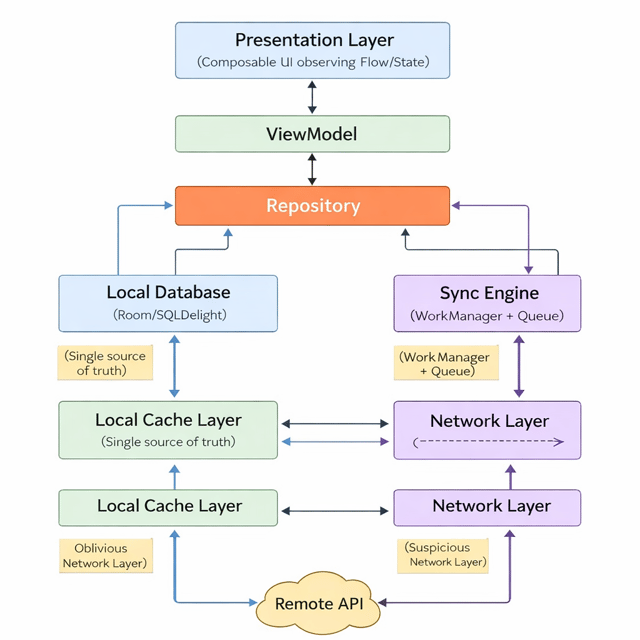
Android Architecture (Deep Dive)
45 Days Android Interview Preparation Plan
100 Most-Asked Jetpack Compose Interview Questions
Ask me anything
Inside Android Memory
Senior-Level ViewModel Interview Scenarios
Resume review
Quick chat
Top 20 Android Gradle Interview Q & A
Real-World Scenario-Based Interview Questions
Android Interview Preparation Kit
SnapshotFlow in Jetpack Compose

Pagination: A Practical Guide
CI/CD for Android Developers
Mobile Authentication & Security Architecture

Crack the Android Interview: 100+ Expert-Level Q&A

Full-Stack Android Engineer Roadmap
Discovery Call
Advanced Testing Interview Q&A
Android Room Database Interview Booklet
1:1 Mentorship
About me
- Linkedinhttps://www.linkedin.com/in/krishanu-android/

Frequently asked questions
What are the most commonly asked Android interview questions and answers?
Most Android interviews, whether at service-based MNCs or product companies, test a consistent set of areas: Kotlin fundamentals and coroutines/Flow, Activity and Service lifecycles, Jetpack libraries such as ViewModel, LiveData, Room, Navigation and WorkManager, Jetpack Compose, MVVM and Clean Architecture, SOLID principles, testing, Gradle and build variants, and performance topics like memory leaks, ANRs and jank. Rote memorisation rarely works because every theory question is followed by a "why" or live coding. The strongest preparation is to work through Android interview questions and answers in your own words and then implement each concept in a small project so you can discuss real trade-offs.
How are Android interview questions and answers for experienced developers different from fresher interviews?
Fresher rounds stay close to fundamentals — Kotlin/Java basics, the activity lifecycle, simple UI tasks and academic projects. Android interview questions and answers for experienced developers, on the other hand, focus on depth and judgement: architecture decisions and their trade-offs, multi-module projects, concurrency with coroutines and Flow, performance optimisation, security, CI/CD, and scenarios like "walk me through a production bug you fixed." The expectation shifts from knowing APIs to justifying decisions, so prepare specific stories with measurable outcomes from your real projects rather than textbook definitions.
What Android interview questions for 5 years of experience are asked in MNC interviews?
At the 5-year mark, Indian MNCs and product companies typically run five to seven rounds: deep Kotlin and coroutines/Flow, architecture (MVVM or Clean, modularisation), Jetpack Compose and migration strategy, performance and memory management, testing strategy, and a system-design round where you design a complete feature such as an offline-first feed, chat, or a push-notification pipeline at scale. Android interview questions for 5 years of experience also probe ownership — release management, crash-rate reduction, mentoring juniors — so go in with quantified impact stories from your current and previous projects.
Which topics matter most in Android interview questions for 2026?
The Android interview questions for 2026 hiring cycles are expected to lean heavily on Jetpack Compose, which is now the default UI toolkit for new apps, along with Kotlin coroutines and Flow, Kotlin Multiplatform (KMP) as adoption grows, offline-first and caching design, mobile security and authentication, modularisation and Gradle build optimisation, CI/CD pipelines, and testing. Legacy topics like AsyncTask and loaders are fading out, while deeper system design and practical debugging scenarios are moving in — so preparing only from old question dumps is the fastest way to fall behind the current bar.
Is preparing from Android interview questions on GitHub enough to crack an interview?
GitHub repositories are a great starting point because they show the breadth of what gets asked, but they rarely crack offers on their own — most repos are question banks without model answers, and interviewers follow up with "why", trade-offs, or live coding on the same topic. A more reliable workflow is to use Android interview questions on GitHub to shortlist topics, write your own crisp answers for each, implement the important ones in a sandbox project, and then close the gaps through mock interviews or feedback from a senior Android mentor.
What is Jetpack Compose in Android?
Jetpack Compose is Android's modern, Kotlin-first UI toolkit for building native interfaces declaratively. Instead of writing XML layouts and manually updating views through findViewById or binding, you describe the UI as composable functions that automatically recompose whenever the state they read changes. Features like state hoisting, unidirectional data flow, and tight Kotlin integration make screens faster to build and maintain, which is why it is now the recommended toolkit for new Android apps and a default requirement in Android job descriptions.
How to learn Jetpack Compose if I already know XML layouts?
Start with the official documentation and codelabs to internalise declarative thinking, then rebuild screens you have already written in XML — converting UI you already understand is the fastest way to learn Jetpack Compose. Master the fundamentals first: composable functions, state and recomposition, state hoisting, and remember vs rememberSaveable; then move to LazyColumn lists, navigation, theming, side effects like LaunchedEffect, and testing. Since most real teams run Compose and XML side by side during migration, also learn interop through ComposeView so you can contribute to existing codebases from day one.
How to use Jetpack Compose in Android Studio?
For a new app, open Android Studio and pick the "Empty Activity (Compose)" template — the IDE wires up Kotlin, the Compose compiler plugin, and the activity-compose dependency for you. To add Compose to an existing project, import the Compose BOM in build.gradle along with material3, ui and ui-tooling dependencies, set buildFeatures { compose = true }, and match the Kotlin compiler extension version to your Kotlin version. Use @Preview to render composables without deploying, enable Live Edit to see UI changes instantly while the app runs, and inspect recomposition behaviour with the Layout Inspector.
Which Jetpack Compose interview questions and answers are asked most often?
The most frequent Compose questions cover what recomposition is and what triggers it, state hoisting, remember vs rememberSaveable, stateful vs stateless composables, and how Compose differs from the XML view system. Mid-level rounds add LazyColumn performance and keys, side-effect APIs such as LaunchedEffect and DisposableEffect, ViewModel integration, and theming, while senior rounds probe stability, skippability, recomposition-count debugging and Compose testing. The candidates who stand out practise Jetpack Compose interview questions and answers with short code examples instead of memorising one-line definitions.
What is Android architecture?
The term is used for two different things, and interviewers often expect you to know both. At the platform level, Android architecture is the layered stack of the operating system: the Linux kernel at the base, the Hardware Abstraction Layer (HAL) above it, native libraries and the Android Runtime (ART), the framework APIs, and the system apps on top. At the app level, it refers to how a project structures its code — typically UI, domain and data layers built on patterns like MVVM with unidirectional data flow. Fresher interviews usually test the platform stack, while experienced rounds focus on app-level architecture and its trade-offs.
What are the main Android app architecture patterns?
The main Android app architecture patterns are MVC, MVP, MVVM and MVI. MVC couples logic tightly to Android classes and scales poorly; MVP improved testability but required heavy interface boilerplate; MVVM — today's default — uses ViewModel with StateFlow or LiveData to keep UI state observable and lifecycle-safe; and MVI enforces a single immutable state with strict unidirectional data flow, which suits complex, state-heavy screens. In modern codebases these presentation patterns usually sit on top of Clean-architecture-style layering (data, domain, UI) with dependency injection, and interviewers expect you to explain when each trade-off makes sense.
Is MVVM still the standard Android app architecture, or should I switch to MVI?
MVVM is still the default expectation across Indian MNCs and product companies, and an Android app architecture with MVVM — ViewModels exposing immutable StateFlow to composables — comfortably handles most production apps. MVI is not a replacement but a stricter variant that enforces a single state object and unidirectional intents, useful for complex, state-heavy screens. In interviews, the winning answer is rarely "MVVM vs MVI"; it is demonstrating that you can justify a choice based on app complexity, team conventions and testability, and that you have implemented the chosen pattern end to end.
What are the Android app architecture best practices every developer should follow?
The Android app architecture best practices that consistently come up in interviews and code reviews are: separate UI from business logic through ViewModels, follow unidirectional data flow, treat the data layer with repositories as the single source of truth, inject dependencies with Hilt for testability, move long-running work onto coroutines and Flow, keep every layer independently testable, handle configuration changes and process death explicitly, and modularise as the codebase grows. Following these keeps large apps maintainable — and gives you concrete, defensible answers when interviewers ask why your app is structured the way it is.