Testimonials
Services
Golden Visa for Creators & Founders
Career Growth 🚀
About me
- Gaurav is highly praised for clear guidance, valuable materials and insights in tech, resume optimization and stock trading. He's reputed as motivational, interactive and knowledgeable, with room to
 AI-generated based on testimonials
 - Change the World With Your Time. Come and Join Us!https://topmate.io/join/gauravghai

Frequently asked questions
What is an ATS resume checker?
An ATS resume checker is a tool that scans your resume the same way an Applicant Tracking System (ATS) does and shows how likely it is to clear automated screening. It checks things like keyword match with the job description, section headings, file format, and whether the text can be parsed correctly. Since most mid-to-large companies in India filter applications through an ATS before a recruiter ever opens the file, testing your resume before applying tells you exactly what is getting it rejected — missing keywords, tables, graphics, or unusual formatting.
What is the ATS resume full form?
The ATS resume full form is "Applicant Tracking System resume." An ATS is software companies use to collect, scan, parse, and rank job applications automatically. So when people say an "ATS resume," they mean a resume built so this software can read every section correctly and rank it highly when recruiters search for candidates. If the system misreads your file, your application can get filtered out even when you are fully qualified for the role.
What is the ATS resume format?
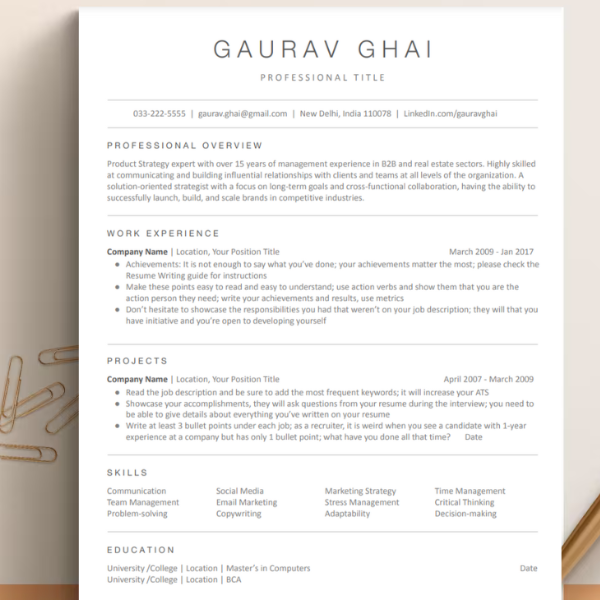
The ATS resume format is a simple, machine-readable layout: a single column, standard fonts like Calibri or Arial, clear headings such as "Work Experience," "Skills," and "Education," and no tables, text boxes, columns, images, or headers and footers that parsing software cannot read. Content should be plain bullets with consistent date formats, and the wording should mirror the job description. Designer-heavy templates often look impressive to humans but break ATS parsing, which is why clean format matters more than visual flair.
How to make an ATS resume?
Start with a clean, single-column layout and standard headings, then write each section in plain text: a short summary aligned to the role you are targeting, a skills section using the exact tools and technologies from the job description, and experience bullets that begin with action verbs and include numbers. Save it as a .docx or a text-based PDF, avoid photos, icons, and tables, and finally test it with an ATS resume checker to catch parsing or keyword issues before you start applying.
Is a free ATS resume template good enough to get shortlisted?
Yes — a free ATS resume template works just as well as a paid one as long as it has a single-column structure, standard section headings, and simple fonts, and as long as you replace the sample content with your own details and keywords from each job description. What usually fails candidates is not the template itself but heavily designed templates that ATS software cannot parse, so always test the final file before submitting. Tailoring the content for every application matters far more than the template you start from.
How to improve resume ATS score?
You can improve resume ATS score mainly by aligning keywords with the specific job description — the skills, tools, and job title should appear in your skills section and experience bullets using the same wording as the posting. Also use standard headings, remove tables, columns, and graphics, keep date formats consistent, and quantify achievements with numbers. Re-test after every edit and tailor the resume for each job instead of sending one generic version everywhere, because a generic resume scores low against almost every posting.
How to pass ATS resume screening?
To pass ATS resume screening, your resume has to be both readable and relevant: machine-friendly formatting (single column, no tables or graphics, standard headings) plus strong keyword match with that particular job description. Use the exact skill names from the posting, place keywords naturally within your experience rather than stuffing them into one line, and skip tricks like white text or hidden keywords, which modern systems and recruiters easily catch. A resume that parses cleanly and ranks well is what actually reaches the recruiter's shortlist.
What is the ideal frontend developer roadmap for 2025?
A practical frontend developer roadmap for 2025 starts with HTML and CSS fundamentals, responsive design, and Flexbox/Grid, then goes deep into JavaScript — ES6 concepts, the DOM, async/await, and fetch. Next, learn Git and GitHub, then React with hooks, routing, and state management, build 3–5 real projects you can deploy and link on your resume, and finish with REST API basics, a little Node.js, and entry-level DSA for interviews. Freshers who get hired fastest are the ones who build and ship projects consistently instead of hopping between tutorials.
What is LinkedIn profile optimization?
LinkedIn profile optimization is the process of improving your profile so it appears in recruiter searches and convinces viewers to reach out — think of it as SEO, but for your career. It covers a keyword-rich headline, an About section written around your target roles, the right skills, measurable achievements in your experience entries, a professional photo, and a custom URL. Recruiters find most candidates by searching keywords, so if your profile does not contain the terms for the job you want, it may never surface no matter how skilled you are.
How do you optimize your LinkedIn profile?
Start with the headline: state your target role and key skills instead of just "Fresher" or "Looking for opportunities." Write an About section that opens with what you do and the keywords recruiters search for, order your skills to match your target job descriptions, and rewrite experience bullets with metrics. Add a custom URL, a clean photo and banner, turn on "Open to Work" for recruiters, and stay active with posts or comments in your domain — regular activity keeps you visible in search results.
How to check LinkedIn profile optimization?
You can check LinkedIn profile optimization with a few quick tests: search your target job title along with your city on LinkedIn and see whether your profile appears in the People results; track Search appearances and recruiter views in your dashboard over a few weeks; and confirm your headline, About, and Experience sections actually contain the exact keywords from the job descriptions you are targeting. If your profile is not appearing for your own target-role searches, the missing keywords are what need fixing first.
Are LinkedIn profile optimization services worth paying for?
They are worth it when the service actually rewrites your headline, About section, and skills around specific target roles instead of just rewording your existing text. This helps most for freshers and career switchers who do not know how recruiters search or which keywords matter for their domain. Before paying, ask whether the person optimizes for your target job descriptions and can show before-and-after search visibility; if you understand the basics well, you can also do it yourself — services mainly buy you speed and an experienced outside eye.
How to switch from non-tech to tech without a CS degree?
You can switch from non-tech to tech by picking one realistic path — web development, data, or testing — and following a structured roadmap for 6–12 months: fundamentals, one stack learned deeply, and 3–5 portfolio projects deployed live. Then translate your current experience into tech language on an ATS-friendly resume, optimize your LinkedIn around the new role, apply strategically to companies known for hiring career switchers, and use referrals and interview practice to convert calls. Plenty of people have made this switch without a computer science degree; consistency and proof of work matter more than the degree.
How useful is a mock interview for freshers?
A mock interview for freshers is one of the highest-return preparations you can do, because most freshers fail not on knowledge but on explaining projects clearly, structuring answers, and handling nerves. A mock run exposes exactly where you freeze — DSA explanation, project walkthrough, or HR questions — while there is still time to fix it. Do one before you start applying and another before a big interview, and pair it with a resume and LinkedIn review so the profile that gets you the call is as strong as the interview itself.